
for people who write everything down
Jot it now.
Find it later. Actually.
You've had a notes.txt open for years. Links, part numbers, a password you really shouldn't have typed there, a to-do from last Tuesday. PopNotes keeps the habit and loses the mess: one hotkey to jot, and it sorts, colors and finds everything for you.
Free, nothing lockedNo accountWindows 10 and 11Mac and iPhone on the way
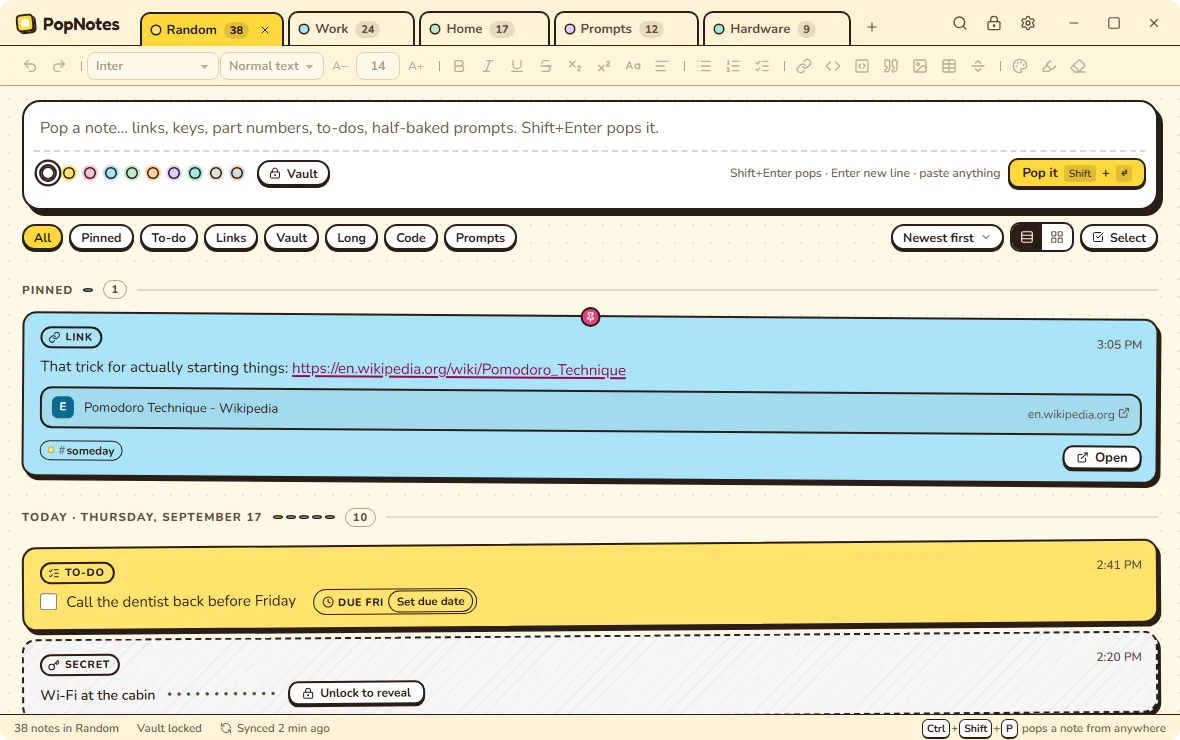
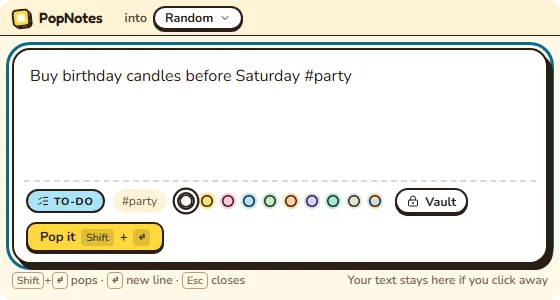
it knows that's a link
Ctrl+Shift+P, from any app
PopNotes is a free note-taking app for Windows. Press a hotkey in any app, type a thought, and it becomes a note in a stack. PopNotes spots what each note is (a link, a to-do, a phone number, a key), keeps it where it belongs, and finds it again in seconds. It works offline, needs no account, and comes with five themes built in and seventeen more free to download.
no install needed for this part
Go on, pop something.
This is the capture box, more or less. Type anything, press Shift+Enter, and watch it land as a note that knows what it is.
Nothing you type here leaves this page, and it's gone when you reload. The real app knows twelve kinds of note and does a lot more with them.
Today
-
Note9:41 AM
Your notes land here, newest on top. Just like the app.
be honest
You have a notes.txt. We can tell.
It's been open since 2019. It's 4,000 lines long. Somewhere in there are a Wi-Fi password, three tracking numbers and the name of a song. Let Notepad do what Notepad does well. PopNotes is for everything else you jot down.
- To-do
call dentist back?? before fri
Due Fri - Link
Pomodoro Technique
en.wikipedia.org - Link
1Z999AA10123456784
Track with UPS - Secret
cabin wifi pw: ••••••••
In the Vault - Part
TN-760 not 730!!!
Search TN-760 - Note
idea: cat-shaped bookshelf
#ideas - Phone
plumber (312) 555-0142
Copy - Color
kitchen??
the whole method
Jot it. Forget it. Find it.
PopNotes is built on one rule: capture first, organize later. Or never. Organizing is its job, not yours.
-
Pop it
Press Ctrl+Shift+P in any app. A little window pops up over whatever you're doing. Type, press Shift+Enter, and you're back before the thought gets away.
-
It sorts itself
PopNotes spots links, to-dos, phone numbers, part numbers, colors, code and keys as you type. Notes land in their stack, grouped by day, with tags suggested. Nothing is required.
-
Find it in seconds
Ctrl+K searches every stack at once. Filter by kind, by #tag or by day. That thing from March? There it is.
dress it up
Make it yours. Then make it weird.
Twenty-two themes, each in light and dark, all free: five built in, and the rest a click away on the theme shelf. A theme changes the whole app, not just an accent color: the tabs, the cards, the fonts, even the little day headers.
Plus Starship, Legal pad, Blueprint, Receipt, Snapshot, Zine, Newsprint, Frosted, Torn paper and Orbit. See them all on the theme shelf, free.
A theme for every stack
Turn on Theme per stack and each stack wears its own: Work in Basic, Random in Comic, Hardware in Terminal. Switch tabs, switch worlds.
A theme is a file
Tweak any color in the token editor, add your own fonts to the theme's folder, and export the result as a ZIP to share. PopNotes checks that the text stays readable. Download more themes.
Paper colors, too
Give any note its own paper color, or let Random pick one that never matches its neighbors. For when you can't decide. Which is always.
what's in the drawer
Everything a junk-drawer brain needs
No dashboards, no workspaces, no "second brain" homework. Notes in stacks. That's the product. Here's what makes it good.
Pop from anywhere
Ctrl+Shift+P opens a little capture window over any app. Pick your own hotkey if you like; PopNotes tells you when another app already took it.
Knows what you jotted
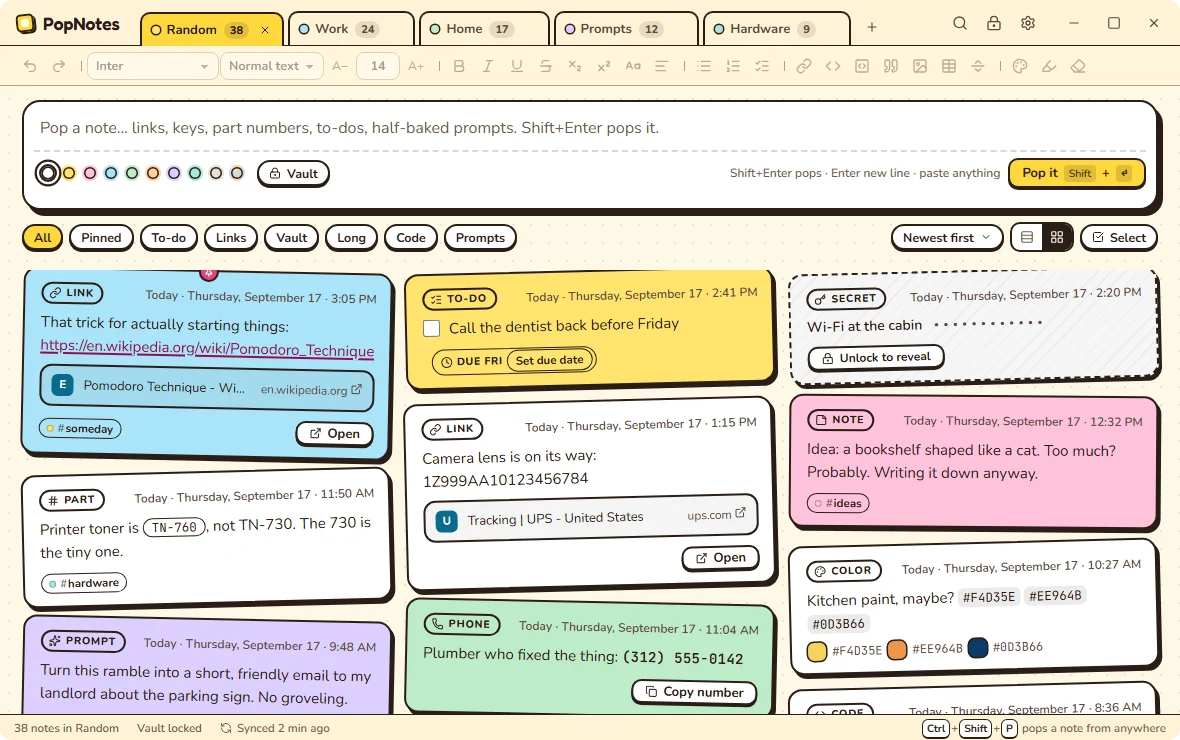
Links, to-dos, phone numbers, part numbers, colors, code, prompts and keys each get their own look and their own buttons. Twelve kinds, detected as you type. Wrong guess? Change it.
Stacks, like tabs
One stack per topic, like the tabs you already keep. Stream or grid, pinned notes on top, every day with its own header.
A Vault for the stuff you shouldn't jot
Paste a key and PopNotes asks, "Looks like a key. Put it in the Vault?" Vault notes are encrypted and masked, and unlock with your passphrase or Windows Hello.
Smart paste
A tracking number becomes a link to UPS, FedEx or USPS. A folder path gets Open in Explorer. A spreadsheet becomes a table, and JSON becomes a code block.
Due dates in plain words
"Call Dana by 3pm." "Water the plants every Sunday." PopNotes offers the date, you click once, and Windows can remind you. Check off a repeating one and it comes back next time.
Suggestions, never bossy
It notices duplicates, stale notes, tags you forgot and the stack a note probably belongs in, and offers a chip. Nothing moves unless you click.
Search everything
Ctrl+K searches every stack at once, #tags included. Save a filter as a smart stack and it becomes a tab.
Rich text, when you want it
Headings, checklists, tables, code blocks, colors, fonts, find and replace, spell check. Or ignore all of it and just type.
Bring your .txt files
Import years of text files, one stack per file. Export to Markdown, plain text, HTML or PDF any time. Nothing gets stranded.
Sync, your way
Turn on sync per stack through your own Google Drive or OneDrive. PopNotes asks for a folder of its own, never your whole drive.
Keyboard all the way down
Everything is reachable without the mouse. Tabs, filters, search, the toolbar, the Vault. Your hands never leave home row. Well, almost.
Light as a sticky note
Close the window and PopNotes waits in the tray at about 9 MB. When it's warm, the Pop window opens in about 50 milliseconds. Leave it running for weeks.
Private by default
No account, no telemetry, no ads. Your notes live on your PC. We couldn't read them if we wanted to, and we don't want to.
Works with Claude
Optional: let Claude Desktop or Claude Code search, read and add notes in the stacks you pick, and suggest edits you accept on the note. The Vault is never shared.
22 themes, one per stack
Five built in and seventeen more on the theme shelf, installed right from Settings. Make your own, share it, or give every stack a different one.
sound like anyone you know?
Made for how you already take notes
You don't need a new system. You need your old habit to stop losing things.
The mid-meeting thought
Someone says a thing worth keeping. Ctrl+Shift+P, type, Shift+Enter. You're back before anyone noticed you left.
The tinkerer
Part numbers, BIOS keys, driver versions, the toner that actually fits. PopNotes knows a part number when it sees one and gives it a Search button.
"TN-760, not 730!!!"The prompt hoarder
Keep your best prompts as Prompt notes. Copy one for your AI in a click, or let Claude use them as ready-made prompts.
The keys-everywhere person
License keys, Wi-Fi passwords, that one API token. Vault them: masked on screen, encrypted on disk, still findable by their label.
The napkin to-do-er
No forms, no fields, no due-date picker. Write it like you'd say it, and PopNotes offers the reminder.
"renew the car registration by October 3rd"The 12-year Notepad veteran
Import every .txt you've got. Each file becomes a stack, and anything that looks like a secret is flagged on the way in. Export back to plain text any time.
The two-PC person
Home desktop, work laptop. Turn on sync for just the stacks you want on both, through your own Google Drive or OneDrive.
The aesthetic fiddler
You'll spend twenty minutes picking a theme before writing a single note. We respect that. Twenty-two of them, light and dark, and you can make more.
no hard feelings
Notepad is great at being Notepad.
PopNotes is the Notepad alternative for your random notes, not your config files. Here's the difference.
| Feature | A notes.txt | PopNotes |
|---|---|---|
| Opens fast | Yes | Yes, from any app with one hotkey |
| Takes whatever you throw at it | Yes | Yes, pictures included |
| Finds that thing from March | Ctrl+F and hope | Ctrl+K across every stack |
| Knows a link from a to-do | No | Twelve kinds, detected |
| Hides your passwords | In plain sight, forever | Encrypted in the Vault |
| Reminds you | No | Due dates from plain words |
| Looks like a comic book | Sadly not | 22 themes, light and dark |
| Plays nice with .txt files | It is one | Imports them, exports back |
Keep Notepad for config files and the grocery list you'll delete tomorrow. Use PopNotes for everything you'll want again.
coming to a pocket near you
Windows today. More places soon.
PopNotes starts on Windows, where the notes.txt habit lives. The Mac comes next, then iPhone, both through their app stores. Android is on the list.
Windows
Windows 10 and 11, 64-bit. Free, right now.
DownloadMac
Coming to the Mac App Store. Touch ID for the Vault is part of the plan.
Coming nextiPhone
Coming to the App Store. Pop a note from your pocket.
After the MacAndroid
On the list. Tell us you want it and it moves up.
On the list
the fine print, in large print
Your notes are none of our business.
- No accountNothing to sign up for. Ever.
- No trackingNo telemetry, no ads, no analytics. Not even on this website.
- Secrets stay secretVault notes are encrypted (AES-256-GCM, Argon2id) and masked on screen.
- Your drive, your folderSync is off until you turn it on, stack by stack, and goes only to your own drive.
Read the privacy policy. It's short, and it's in plain English.
the easy part
Get PopNotes for Windows
Free, for Windows 10 and 11 (64-bit). It installs just for you, so there's no admin password to find.
Download PopNotes PopNotes-setup.exe · v0.1.0 · 64-bit · 13.1 MB- Windows 10 or 11, 64-bit
- No account, no sign-up, no email
- If your PC is missing Microsoft's WebView2, the installer fetches it
- Uninstall any time from Settings > Apps
A heads-up about the blue box
PopNotes isn't code-signed. A signing certificate costs hundreds of dollars a year and PopNotes is free, so Windows may warn you the first time:
- If your browser says the file isn't commonly downloaded, choose Keep.
- If Windows says "Windows protected your PC," click More info, then Run anyway.
When PopNotes reaches the Microsoft Store, Microsoft signs it and the warning goes away. Want to check the file first? Compare its fingerprint with what Get-FileHash says in PowerShell.
101C9D2CD04D4ABA6D35E983BC271F4A6E7B95619A74DE2BD11F2B204D51B088
Free. Actually free.
No trial, no Pro tier, no "upgrade to unlock dark mode." Every feature is in the free app. If PopNotes replaced your text file, buy me a coffee.
— Chris, who also had a notes.txt
you were going to ask
Questions, answered
Is PopNotes really free?
Yes. Every feature is in the free app. There is no trial, no paid tier, no ads and no account. If you like it, you can tip on Ko-fi.
Is PopNotes a Notepad replacement?
For your notes, yes. Keep Notepad for editing files. PopNotes is for the things you jot down and want to find again. It imports your old text files and exports back to plain text whenever you like.
Do I need an account?
No. PopNotes works without signing up for anything. The only sign-in is optional: your own Google Drive or OneDrive, if you turn on sync for a stack.
Where are my notes stored?
On your PC. If you turn on sync for a stack, a copy goes to a PopNotes folder in your own Google Drive or OneDrive. Nothing goes to us: PopNotes has no servers.
Is it safe to keep passwords in PopNotes?
Put them in the Vault. Vault notes are encrypted with AES-256-GCM under a key protected by your passphrase (Argon2id), masked on screen, and locked again on a timer. You can unlock with Windows Hello. PopNotes also notices when something looks like a key and offers to vault it. Forget the passphrase and nothing can recover those notes, which is the point.
Why does Windows warn me when I install PopNotes?
The installer isn't code-signed. Signing certificates cost hundreds of dollars a year and PopNotes is free, so Windows SmartScreen may show "Windows protected your PC." Click More info, then Run anyway. You can check the file's SHA-256 fingerprint in the download section first. When PopNotes reaches the Microsoft Store, Microsoft signs it and the warning goes away.
Is there a Mac, iPhone or Android version?
Not yet. The Mac version comes next, through the Mac App Store, then iPhone through the App Store. Android is on the list.
Can I import my old text files?
Yes. Each text file becomes a stack, split into notes at blank lines. You see a preview first, anything that looks like a secret is flagged so you can put it in the Vault, and importing the same file again updates notes instead of duplicating them.
Can I make my own theme?
Yes. Every theme is a file. Change its colors in the token editor, add your own fonts to its folder, and export it as a ZIP. Five themes come built in, each in light and dark, and seventeen more are free: open Settings > Appearance > Get more themes, or download them here.
Does PopNotes work with Claude?
Yes, if you want it to. Turn on the Claude connection in Settings and Claude Desktop or Claude Code can search, read and add notes in the stacks you choose, and suggest tags or edits that you accept on the note. Every stack stays hidden until you show it, and the Vault is never shared. It uses your Claude plan; there is no API key to set up.
How much memory does PopNotes use?
Very little. Closed to the tray, PopNotes measured about 9 MB. The Pop window opened in about 50 milliseconds when warm. With the main window open on 10,000 notes it measured about 127 MB.
Does PopNotes send my notes anywhere?
Only where you tell it to. There is no telemetry. PopNotes goes online to sync a stack you turned on for sync, to fetch a link's page title when you click Fetch title (link titles are off until you turn them on), and to read this site's theme shelf when you open Get more themes… (it's on by default, sends nothing about you, and switches off in Settings). Opening a link opens your browser. The privacy policy has the details.